


Taximeter
4.4133.00 Reviews
App Specs
- Version
- 1.1.147
- Updated On
- License
- $17.99
- Downloads
- 10,000+
- Developer
- Planet Coops
- Categories
- Auto & Vehicles
- Platform
- Android, iOS
Screenshots
 Analysis by AppCompare
What gives a taxi meter lasting value is not the novelty of watching a fare climb on a phone. It is whether the tool fits a driver’s routine, stays understandable during a busy shift, and makes trip records easier to manage. Taximeter is aimed at that practical job: Planet Coops’ Auto & Vehicles app has a 4.4 average from around 700 ratings, and its appeal depends less on spectacle than on whether a driver will keep reaching for it after the first few rides.
Where it fits into a working shift
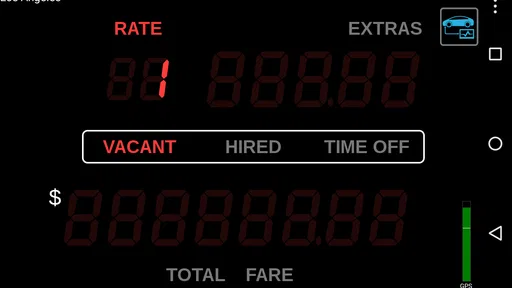
A useful way to judge a phone-based meter is to imagine a normal day rather than a test drive. A driver can set up a fare structure before starting work, begin a trip when a passenger gets in, and glance at distance, elapsed time, and fare while keeping attention on the road. The app’s large start button and compact display suit that basic rhythm better than a cluttered screen would.
The fare summary and saved trip information matter most after the passenger leaves. For example, a driver who wants to review several fares at the end of a shift can use the recorded time, distance, and surcharges as a reference instead of relying on memory. Exporting trip data may also help with personal bookkeeping, though I would treat it as a useful record rather than assume it replaces a formal accounting system.
Making the setup work for your route
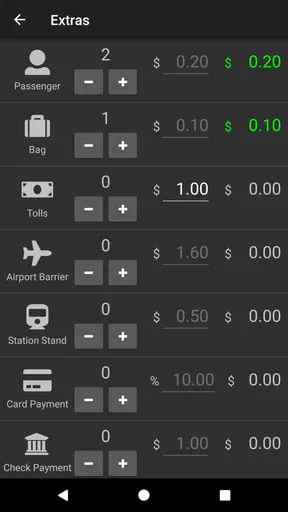
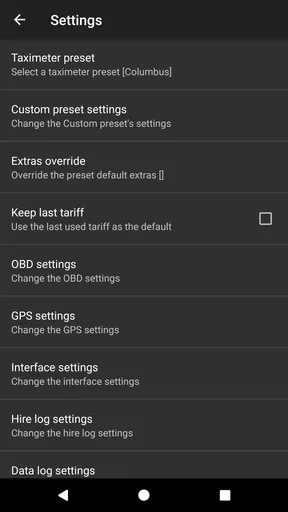
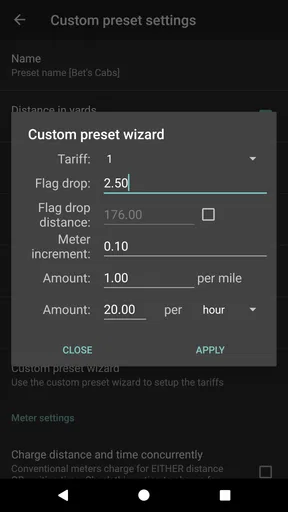
The flexibility to enter a base fare, distance rate, waiting charge, and surcharges is valuable only if the values match the rules that apply to the driver’s work. I would check the fare structure carefully before relying on a trip total, especially if rates change by time of day or include local extras. A small setup mistake can produce a neat-looking but misleading figure, so a short trial with a known route is a sensible habit before using the meter with passengers.
That trial is also a practical way to learn how the phone behaves in the car. GPS-based distance can be affected by the route and the phone’s location signal, so I would compare a few familiar trips rather than assume every journey will match a vehicle’s installed meter exactly. Taximeter can offer a useful independent reference, but local regulations and the official equipment required for commercial work still take priority.
When a phone meter is the better alternative
Compared with a dedicated in-car meter, a phone app is easier to carry between vehicles and can be a lower-friction backup when a driver needs a second way to estimate a fare. It also gives passengers a visible breakdown that may make a conversation about distance, waiting, or an added charge more concrete. The trade-off is that a phone depends on its own battery, screen, mounting position, and GPS reception; dedicated equipment may be the more dependable choice for someone who needs a permanently installed, regulated setup.
It is also different from a general navigation app. Navigation is designed to guide a route, while this app’s purpose is to calculate a taxi fare from a configured rate structure and trip measurements. A map can help with directions, but it is not a substitute for a meter when the job is tracking time and fare. For a passenger who only wants an occasional rough comparison, however, opening a paid professional tool and configuring rates may be more effort than it is worth.
Worth Reading Before You Choose

Baby Panda World Brings Quick Play to Modern Phones, but Its Game Library Feels Busy

ESPN’s Live Game View Makes Following Close Games Easier

QuizzLand Review: A Good Fit for Short Trivia Breaks, Not Every Player

Basketball Stars: Multiplayer Is Fast, but Can It Recover When Matches Go Wrong?

WEBTOON Turns Phone Updates Into a Better Reading Routine

Link to Windows Runs on Shared Habits, Not Social Feeds
For a realistic example, imagine a driver who takes a late-evening passenger across town and then waits briefly at a stop. The driver can use a night rate or waiting charge if those have been configured, then check the final breakdown when the trip ends. That workflow makes the app more useful than a simple distance estimate, but it depends on the driver selecting the correct setup and starting and stopping the trip at the right moments.
Getting Started with Taximeter
From the moment you download Taximeter, setting it up is a breeze. The app is available on both Android and iOS, which is a huge plus. I was pleasantly surprised by how intuitive the interface is. Right off the bat, the app asks for some basic permissions, like location, which makes sense since it needs to track your ride to calculate fares accurately.
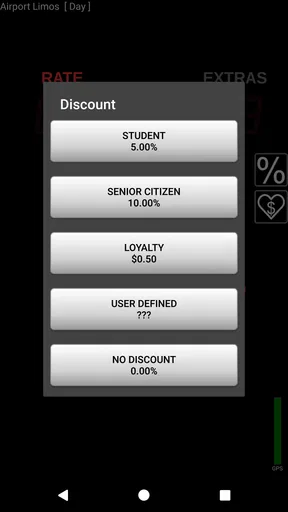
The initial setup involves entering the rate structure. If you’ve ever been curious about the magic numbers behind taxi fares, this is where the fun begins. You can input variables like base fare, cost per mile, waiting time charges, and even surcharges for night rides or peak hours. It’s like having a peek behind the curtain of taxi operations, and I must admit, I felt a bit like a savvy cab operator myself!
The Interface: Simple Yet Effective
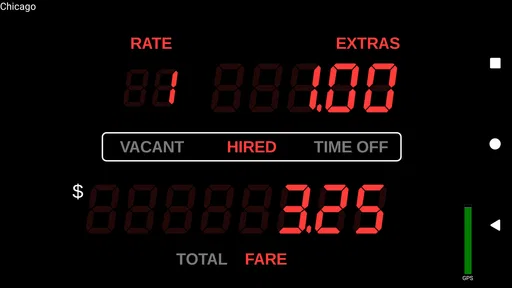
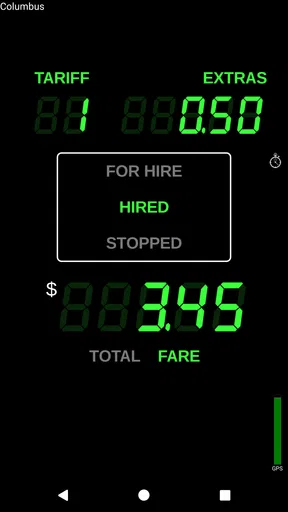
The interface is clean and straightforward, which I appreciate. There’s a large start button that kicks off the meter, and the display shows the distance traveled, time elapsed, and the fare. It’s all neatly laid out so you can glance at it without getting distracted.
One of the standout features is the ability to switch between day and night modes. It’s a small touch, but it makes a difference when you’re driving at night and need something easy on the eyes. The app also lets you customize the interface color, which is a neat way to add a personal touch.
Performance and Accuracy
Now, let’s talk performance. I took the app for a spin on a few rides around town and compared the fare it calculated with the actual taxi meter. I was impressed by how accurate it was, often coming within a few cents of the real deal. The GPS tracking is spot on, and it adjusts quickly to changes in route or speed.
If you’re worried about data usage, don’t be. The app is surprisingly light on data, making it perfect for those long trips without burning through your mobile plan. Plus, it works offline, which is a lifesaver if you’re in an area with spotty reception.
Additional Features Worth Mentioning
One feature that caught my attention is the fare summary. After each trip, the app provides a detailed breakdown of the fare, including time, distance, and any surcharges applied. It’s not just useful for drivers but also for passengers who want to understand their fare better.
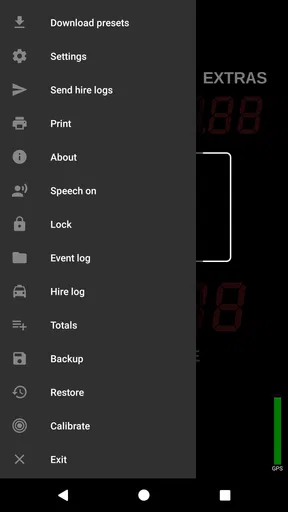
There’s also an option to save trip data and export it. This can be super handy for professional drivers who need to keep track of their earnings or for anyone who wants to analyze their travel habits.
Who’s It For?
While Taximeter is clearly designed with professional taxi drivers in mind, it’s also a fun and functional tool for anyone curious about how taxi fares are computed. Whether you’re a city dweller who wants to ensure you’re being charged fairly or just someone who loves tinkering with numbers, this app has something to offer.
Moreover, it can be a great backup for those times when the taxi’s built-in meter isn’t functioning properly. Having a reliable alternative on your smartphone can save you from fare disputes and ensure transparency during your ride.
What can wear thin over time
The first-week appeal is easy to understand: setting rates, watching the fare update, and comparing a familiar trip with an installed meter can be engaging. The longer-term question is whether those tasks solve a recurring problem. A working taxi driver who needs trip records or a backup calculation has a reason to keep the app close. Someone who only wants to inspect a fare once may find that curiosity fades quickly, especially with a $17.99 price.
There is also a small but important maintenance burden. Rate structures need to stay current, and the driver has to remember to begin and end each trip consistently. When a phone is being used for navigation, calls, or other work, switching attention between tasks can become tiring. I would keep the meter workflow simple: check the rate before a shift, avoid changing settings between passengers unless necessary, and verify the trip summary before relying on it for records.
The app’s offline operation is helpful where reception is weak, but offline use should not be confused with freedom from all phone-related limits. GPS reception, battery charge, and a clear view of the screen still matter. Drivers who spend long shifts on the road may prefer a dedicated meter or a setup designed around their vehicle, while casual users may be better served by checking a fare with an ordinary calculator or asking the driver about the rate.
The app is rated for Everyone, and the current version is 1.1.147, with a minimum operating-system requirement of 5.0. It has been available since Oct 23, 2010, and has reached over 10,000 installs. Those details suggest a long-running, modestly sized utility rather than a novelty built around social sharing or constant entertainment. I would think of it as a focused tool: its value comes from repeating the same practical job, not from regularly discovering new content.
One question many drivers may have is whether it can stand in for a legally required taxi meter. I would not assume that it can. A phone-based calculation can support transparency or serve as a backup, but professional drivers should follow the rules and equipment requirements where they operate. Another practical question is whether it needs mobile data throughout a trip; offline operation helps when reception drops, although location accuracy still depends on the phone’s GPS conditions.
For occasional passengers, the key question is whether the price is justified by how often they will use it. If you regularly need to compare fares or inspect trip breakdowns, having a meter ready may be worthwhile. If this is just a one-time curiosity, the cost and setup make it a less natural fit. The same distinction applies to drivers: the app makes more sense as part of a repeatable work routine than as an emergency tool installed only after a meter problem appears.
Wrapping It Up
All in all, Taximeter is a nifty little app that does exactly what it promises. It's user-friendly, accurate, and packed with features that make it a worthwhile addition to any smartphone. Whether you’re using it for professional purposes or just for fun, it’s a great way to bring a bit of transparency to your taxi rides.
So, if you’re ready to ditch the guesswork and take control of your taxi fares, head over to the app store and give Taximeter a try. You might just find you enjoy the ride a little more when you’re in the know!
My long-term take
I’d recommend it most to a driver who will use the fare setup, live trip display, and saved summaries repeatedly, and who is comfortable checking rates and phone readiness as part of the workday. Its practical appeal is real, but it is not a universal replacement for installed equipment or a must-have for every passenger. If the app solves a regular problem for you, it can earn its space; if not, the initial fascination with watching a fare tick upward is unlikely to be enough on its own.
Pros
- User-friendly interface for easy navigation.
- Accurate fare calculations in real-time.
- Supports multiple languages for global use.
- Customizable settings for different taxi services.
- Works offline to avoid data usage issues.
Cons
- Battery drain can be significant over long use.
- Occasional GPS inaccuracies in dense areas.
- Limited integration with some payment apps.
- Frequent updates can disrupt user experience.
- Not compatible with older smartphone models.
FAQs for Taximeter
What is Taximeter and how does it work?
Taximeter is a mobile application designed to transform your smartphone into a functional taximeter. It calculates fares based on distance and time, providing an accurate pricing model for taxi drivers. Users input their desired rates, and the app uses GPS data to track trips and calculate costs in real-time.
Is Taximeter available on both Android and iOS?
Yes, Taximeter is available for download on both Android and iOS platforms. You can find it on the Google Play Store for Android devices and the App Store for iOS devices. Ensure your device meets the app’s system requirements for optimal performance.
Does Taximeter require an internet connection to function?
Taximeter primarily uses GPS to track distance and calculate fares, which can function offline. However, certain features like map updates, route optimization, and fare sharing may require an internet connection. It’s recommended to have a stable connection for the best experience.
Can I customize fare rates in Taximeter?
Absolutely, Taximeter allows users to fully customize fare rates to match local regulations or personal preferences. You can set base fares, per-kilometer rates, and waiting charges. This flexibility ensures you can adapt the app to different regions and pricing models.
Is Taximeter user-friendly for non-tech-savvy individuals?
Yes, Taximeter is designed with a user-friendly interface, making it accessible even for those who are not tech-savvy. The app offers straightforward navigation, clear instructions, and a simple setup process, allowing users to start using it efficiently without any technical difficulties.


